> ## Documentation Index
> Fetch the complete documentation index at: https://docs.userplane.io/llms.txt
> Use this file to discover all available pages before exploring further.
# Raycast Browse Links
> Browse recording links with filters and sorting from Raycast
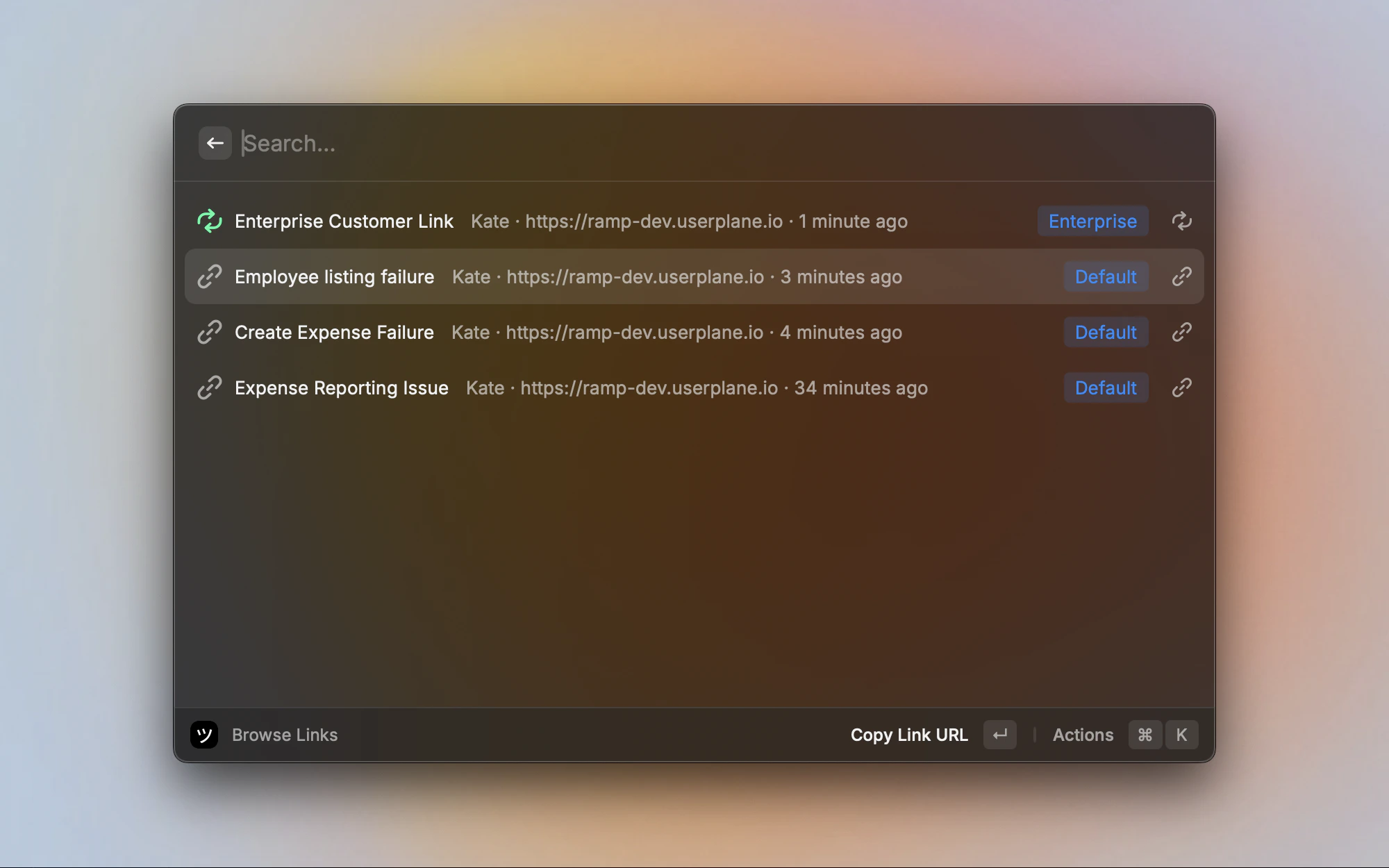
The **Browse Links** command displays your workspace recording links in a searchable list. Links can be filtered by creator, project, or domain, sorted by date or title, and their URLs can be copied or opened directly.
## Browsing links
Links are displayed in a list view. Each link shows:
* **Title** — the link title, or the domain URL if no title exists.
* **Creator** — name of the person who created the link.
* **Domain** — the domain the link uses.
* **Created** — relative time ("2 hours ago", "yesterday").
* **Project tag** — a blue badge showing the associated project, if any.
* **Reusable indicator** — a green repeat icon for reusable links, or a link icon for single-use links.
 ## Filtering
Press **Cmd+F** to open the filter screen. Filters narrow the links list by one or more dimensions:
* **Creators** — show links created by specific team members.
* **Projects** — show links from one or more projects.
* **Domains** — show links using specific domains.
Filters can be combined — selecting a creator and a domain shows only links matching both criteria. Filters are saved per workspace and auto-apply on next use.
To clear all filters and reset sorting, press **Cmd+Shift+F**.
## Sorting
Sort links using the Sort section in the action panel:
| Sort option | What it does |
| -------------------- | ------------------------------------- |
| **Newest First** | Most recently created first (default) |
| **Oldest First** | Oldest links first |
| **Title Ascending** | Alphabetical A to Z |
| **Title Descending** | Alphabetical Z to A |
## Link actions
Select a link and use the action panel:
| Action | Shortcut | What it does |
| --------------------------------- | ------------- | ------------------------------------------------------ |
| **Copy Link URL** | — | Copies the recording link URL to your clipboard |
| **Open Link** | — | Opens the recording link in your browser |
| **View Recordings for This Link** | `Cmd+R` | Opens the dashboard filtered to this link's recordings |
| **Filter & Sort...** | `Cmd+F` | Opens the filter screen |
| **Clear Filters** | `Cmd+Shift+F` | Resets all filters and sorting to defaults |
| **View All in Dashboard** | — | Opens the full links list in the dashboard |
## Workspace switching
If you belong to multiple workspaces, open the action panel and select **Switch Workspace** to change which workspace's links are displayed. Your selection is remembered for next time.
## Pagination
The list loads a limited set of links. When more links exist, a **View all in Dashboard** item appears at the end of the list. Clicking it opens the full links list in the Userplane dashboard.
## Related articles
* [Raycast Extension](/integrations/raycast) — installation, setup, and menu bar.
* [Raycast Create Recording Links](/integrations/raycast-create-links) — create and share recording links.
* [Raycast Browse Recordings](/integrations/raycast-recordings) — browse recordings with thumbnails and filters.
* [Managing Recording Links](/recording-links/managing) — link management in the Userplane dashboard.
* [Recording Link Overview](/recording-links/overview) — how recording links work.
## Filtering
Press **Cmd+F** to open the filter screen. Filters narrow the links list by one or more dimensions:
* **Creators** — show links created by specific team members.
* **Projects** — show links from one or more projects.
* **Domains** — show links using specific domains.
Filters can be combined — selecting a creator and a domain shows only links matching both criteria. Filters are saved per workspace and auto-apply on next use.
To clear all filters and reset sorting, press **Cmd+Shift+F**.
## Sorting
Sort links using the Sort section in the action panel:
| Sort option | What it does |
| -------------------- | ------------------------------------- |
| **Newest First** | Most recently created first (default) |
| **Oldest First** | Oldest links first |
| **Title Ascending** | Alphabetical A to Z |
| **Title Descending** | Alphabetical Z to A |
## Link actions
Select a link and use the action panel:
| Action | Shortcut | What it does |
| --------------------------------- | ------------- | ------------------------------------------------------ |
| **Copy Link URL** | — | Copies the recording link URL to your clipboard |
| **Open Link** | — | Opens the recording link in your browser |
| **View Recordings for This Link** | `Cmd+R` | Opens the dashboard filtered to this link's recordings |
| **Filter & Sort...** | `Cmd+F` | Opens the filter screen |
| **Clear Filters** | `Cmd+Shift+F` | Resets all filters and sorting to defaults |
| **View All in Dashboard** | — | Opens the full links list in the dashboard |
## Workspace switching
If you belong to multiple workspaces, open the action panel and select **Switch Workspace** to change which workspace's links are displayed. Your selection is remembered for next time.
## Pagination
The list loads a limited set of links. When more links exist, a **View all in Dashboard** item appears at the end of the list. Clicking it opens the full links list in the Userplane dashboard.
## Related articles
* [Raycast Extension](/integrations/raycast) — installation, setup, and menu bar.
* [Raycast Create Recording Links](/integrations/raycast-create-links) — create and share recording links.
* [Raycast Browse Recordings](/integrations/raycast-recordings) — browse recordings with thumbnails and filters.
* [Managing Recording Links](/recording-links/managing) — link management in the Userplane dashboard.
* [Recording Link Overview](/recording-links/overview) — how recording links work.